The programmers itch
As one could easily tell by reading the articles on this site, almost all of which revolve around computing or programming I take great enjoyment in having just enough skills with a computer to be able to whip out a laptop and peck out a quick program to solve some mundane problem.
I have been seen to pull out my laptop, on the bus on the way to a ski-trip to create a program to gather statistics on my skiing day, during family holidays to make up a spreadsheet to easily score and graph the progress of games of cards, to come up with scripts to get out of having to go though pages of paper to count up different things and many other occasions.
Just recently I have discovered how strong this "itch" to write programs to solve silly programs to solve every day problems, when lying in bed, flicking though comics and I came across this.

While the regular person may be amused by the joke, or think it isn't funny at all the programmer in me instantly thought, It couldn't be that hard to figure out what he said. So of I went, ending up with this little program.
from collections import defaultdict

def strip(word):
    out = ""
    for letter in word:
        if letter in "aeiou":
            out += letter
    return out

def paths(tree,base=''):
    for leaf in tree[0]:
        if len(tree)==1:
            yield base + " " + leaf
        else:
            for branch in paths(tree[1:],base + " " + leaf):
                yield branch

words = defaultdict(list)
f = open("words.txt")
for line in f:
    line = line.strip().lower()
    stripped = strip(line)
    if stripped:
        words[stripped].append(line)
f.close()

col_width = 10

raw_sentence = "A UI AOE UIE OU EAI"
sentence = raw_sentence.lower().split(" ")

sentence_tree = []
for word in sentence:
    sentence_tree.append(words[word])

for result in paths(sentence_tree):
    print result
I am quite proud of some parts of my code, like the nice little recursive function/generator for traversing the tree, but I was a bit lacking foresight as to what kind of, or should i say how many results my program would produce. To try and figure out exactly how many results I began with adding a rather naive counter to the final loop and commenting out the print statement. 20 minutes latter and still with no results, I realized how this approach was not going to be a success. That gave rise to this line, which is able to calculate instantly how many possible things could have been said in the comic.
print reduce(lambda a,b:a*b,map(len,sentence_tree)), "possible arrangments"
And this makes it fairly obvious why it was taking so long to list the results with 24299547659100 possible arrangements. Naturally this led on to looking up different topics such as language parsing so that I would be able to determine how much grammatical sense a sentence makes. Only at this point did I realize that I had got rather sidetracked on trying to get to sleep, and gave up on finding out what he could have said as a problem for another day. Maybe in the next couple of days I will get really interested in the problem again and try and write a program where I can outsource to the internet and have it present people with a sentence and have them say yes or no to if it makes sense.
And that's what has led me to write up this article, this "itch" to think you are able to come up with a clever way to try and figure out what the majority of people would not even consider.
Interactive Donation Box – Folio
I just thought that i would post up my project's portfolio here for people wanting to read about its development, or for people who are doing D&T for their HSC and need a bit more of an idea on what needs to go into a portfolio. A bit of a disclaimer though if you fall into this category, is i have got no marks back yet for this project so i cannot guarantee it is what the DET is looking for in a portfolio.
[download id="26"]
Interactive Donation Box – Behind the scenes
This is a follow up article to explain the inner working of my interactive donation box if you don't have a clue what this is see my other post HERE. Besides all the visible track elements who's operation is clearly visible there are a number of hidden aspects of the machine.
The main part of this is the mechanism for sorting and counting coins (See video below). For this i used a mechanical system of sorting the coins based upon their size. I had originally used this system in a money box that sorted coins into different trays, and knew of a few things that would greatly improve its performance. Firstly to make the back rest out of some kind of plastic material so that its finish will remain much more constant than with wood which gradually changed over time as the finish was absorbed or rubbed off, the other improvement to be made was to use rectangular holes for the coins to fall though instead of circular holes, this just allows the coins longer to fall though their holes, making it virtually impossible for them to miss their hole.
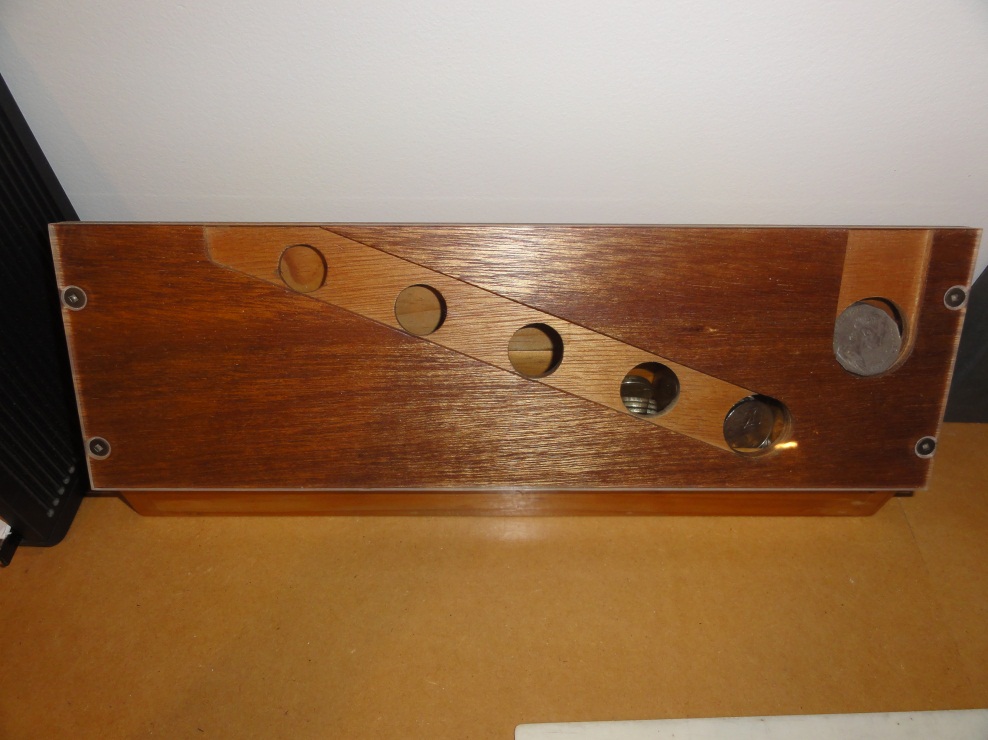
A coin sorting money box that i made for a junior D&T course
After the creation of this video i made a few change to the sorter to improved it's reliability, mainly replacing the front guide that stops coins jumping off their tracks with a stiffer version to stop 20c coins sometimes escaping off the front.
To detect the coins after they had been sorted i decided upon using a beam break system as this would mean i could reliably detect the coins even without having to worry about if the coins were heavy enough to set off a micro-switch. So i simply have a row of leds on one side of the slots the coins fall though after being sorted and a row of Light dependent resistors on the other, these are hooked up to analog in pins on the arduino controlling the system.
After a coin has been detected the program is quite simple, a certain value is added to the counter depending on what coin has been inserted, the lift i turned on whenever this value is non-zero and the counter is decremented whenever a marble passes a micro-switch hidden within one of the lift guides.
There are only a few things that i would like to do in the future, the main being to reclaim my arduino out of the back of the display, probably replacing it with a MSP430 chip as these are very cheap (under a dollar) meaning i could reclaim my arduino for future projects.
Edit: If you are interested on more details on the construction of this project i have now made my portfolio available HERE.
Interactive Donation Box
Well it was right down to the line but i managed to get my Design and Technology project finished and ready for marking, just... I only had confirmation that all the parts of the project played nicely together after rapidly programming it and getting to put coins into it for the first time at 3AM on the morning it was due. After a quick dash to office works at 7AM i was ready at school to hand my project in on time at 9AM.
Even though the projects design had to be greatly modified from its original 3 window design a I am really happy with how well the project has turned out and with all of the really positive responses I have got from other students and teachers. Without any more words here is the project.

Just in-case you haven't read my previous posts from way back about what the donation box actually is, here is a quick summary.
When somebody puts a coin into the machine it is sorted by currency and depending on the value of the coin a certain number of marbles are sent though a marble run (i decided on the rate of 1 marble per 10c). The idea of the project is that if it is made more interesting for people to donate then people are much more likely to make a contribution.
To better display this here is a video of the project in action
Also thanks to MWandel of woodgears.ca for his gear template generator and general articles on marble machines that made me pick this as a project
After i finish up with UNI preferences and scholarship applications i will hopefully have some more info up on what goes on behind the project
Edit: I now have another post up detailing some of the inner workings of the project HERE
Edit: If you are interested on more details on the construction of this project i have now made my portfolio available HERE.
Analyzing Skiing Data
My favorite sport would have to be skiing by far, nothing can match the awesome thrill and relaxation that it provides. Over the past few years I have begun skiing with a handheld GPS so that I have been able to record things like distance traveled, max speed ect.
While this has provided some interesting stats over the years such as and overall top speed of 88.8 km/h or a total distance traveled in a single day as 81km, I have always wanted to be able to see more detail on my day's skiing.
This year I have finally got around to having a crack at making a program to analyze GPX file that my GPS records and trying to separate data from lifts and ski-runs. After a few hours procrastinating during exam week and a few hours on a bus on the way to our school ski trip i have managed to come up with a woefully inefficient but reasonably effective program that is able to do just that.
My program takes the GPX file and outputs a range of statistics on runs and lifts as well as outputting a KML with the ski-runs separated from lifts. Here is some example data from my current version of the program generated from last day of skiing on the trip.
Runs:			| 28
Lifts:			| 24
-------------------------------------------------------------------------------
Max run speed		| 94.06
Ave run speed		| 10.035
-------------------------------------------------------------------------------
Max run length:		| 3568
Min run length:		| 49
Ave run length:		| 1459
Total run length:	| 40877
-------------------------------------------------------------------------------
Max lift length:	| 1763
Min lift length:	| 389
Ave lift length:	| 921
Total lift length:	| 28319.7737391
This data is reasonably accurate except for the maximum speed which is only measured as an inaccurate point speed (I will soon average speeds over a few data-points) and the discrepancy between the number of runs and the number of lifts is caused by things like the loss of GPS reception when I went into a restaurant for lunch.
To accompany the raw data here are some screen shots from within Google Earth. In the pictures chairlifts are represented by the solid read lines and the runs are represented by the squiggly blue lines. The pins in the middle of each lift are click-able and provide statistics on the lift when clicked.
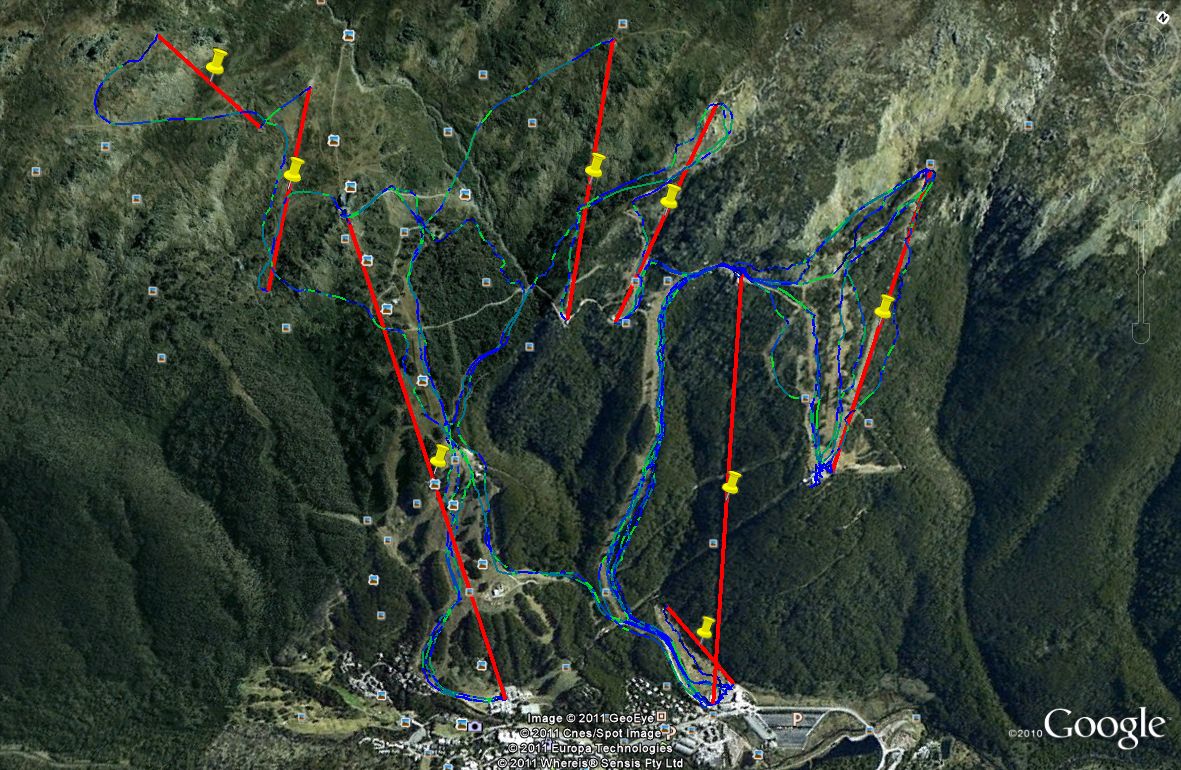
Direct top down view
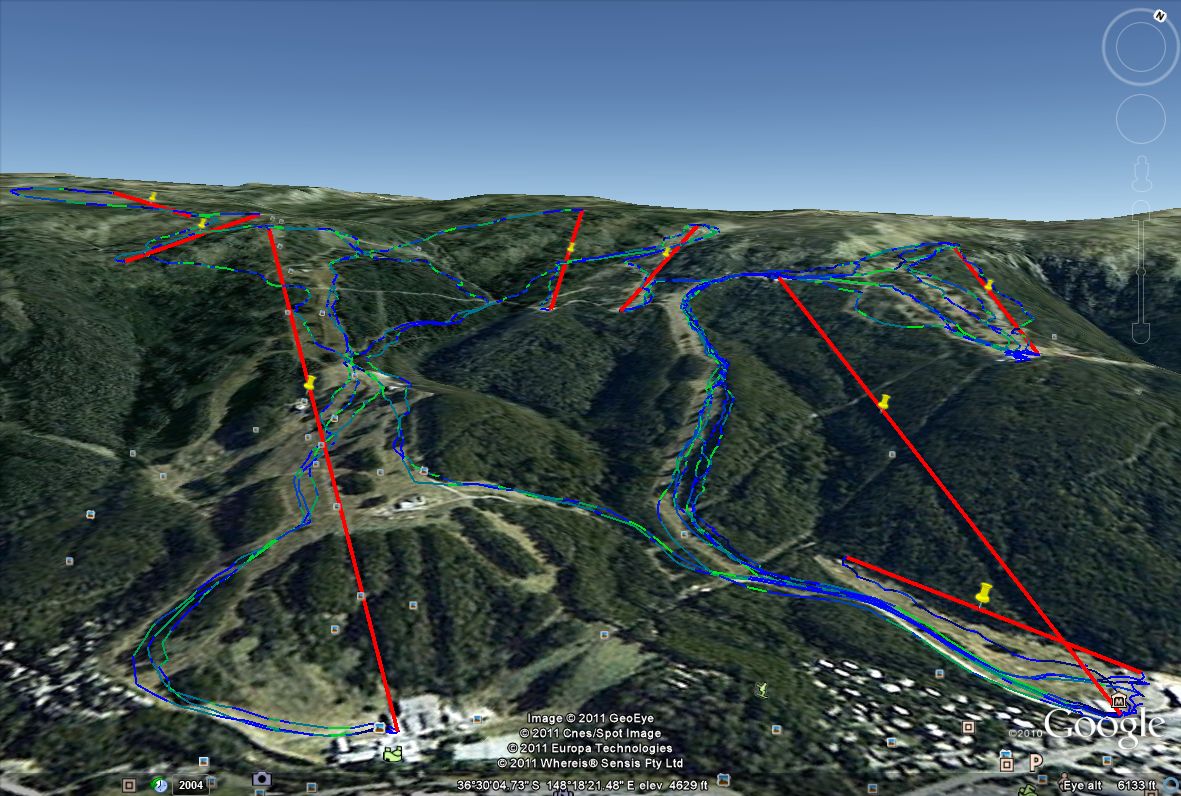
A slightly side on view

A closeup of the lift data
Unfortunately there is no version of this program that i deem suitable for download at the current time. In the future i plan to work on this further making it more efficient as well as turning it into a website where people are able to upload their skiing data to generate their own maps and statistics as well as including some social aspects into the process.