Pyweek 13 – September 2011
I have recently just finished pyweek 14 and only just realized now that I had not put anything up here yet for pyweek 13.
For pyweek 13 I had been doing a fair bit of coding in python prior to the competition and was feeling a bit ambitious
The theme was "Mutation" so the concept i ended up deciding on was a platformer where the player collected mutations that would help them get though the game, I had also being playing VVVVVV a bit so I wanted to try and make the game have, lots of things to kill you, with dying being a minimal setback. Throw in some dynamic lighting for the hell of it and you have a pyweek entry.
The entry can be found at http://www.pyweek.org/e/allisonInWonder/
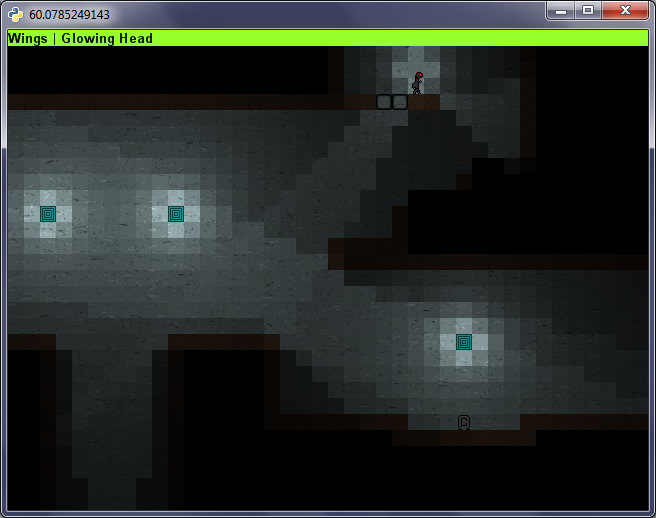
It didnt get as finished as I would like with things like the lack of an ending, sounds, extensive level testing and with a few bugs left in.
I wont put much more info here but you can check it out on the pyweek site if you want more info.
The programmers itch
As one could easily tell by reading the articles on this site, almost all of which revolve around computing or programming I take great enjoyment in having just enough skills with a computer to be able to whip out a laptop and peck out a quick program to solve some mundane problem.
I have been seen to pull out my laptop, on the bus on the way to a ski-trip to create a program to gather statistics on my skiing day, during family holidays to make up a spreadsheet to easily score and graph the progress of games of cards, to come up with scripts to get out of having to go though pages of paper to count up different things and many other occasions.
Just recently I have discovered how strong this "itch" to write programs to solve silly programs to solve every day problems, when lying in bed, flicking though comics and I came across this.

While the regular person may be amused by the joke, or think it isn't funny at all the programmer in me instantly thought, It couldn't be that hard to figure out what he said. So of I went, ending up with this little program.
from collections import defaultdict

def strip(word):
    out = ""
    for letter in word:
        if letter in "aeiou":
            out += letter
    return out

def paths(tree,base=''):
    for leaf in tree[0]:
        if len(tree)==1:
            yield base + " " + leaf
        else:
            for branch in paths(tree[1:],base + " " + leaf):
                yield branch

words = defaultdict(list)
f = open("words.txt")
for line in f:
    line = line.strip().lower()
    stripped = strip(line)
    if stripped:
        words[stripped].append(line)
f.close()

col_width = 10

raw_sentence = "A UI AOE UIE OU EAI"
sentence = raw_sentence.lower().split(" ")

sentence_tree = []
for word in sentence:
    sentence_tree.append(words[word])

for result in paths(sentence_tree):
    print result
I am quite proud of some parts of my code, like the nice little recursive function/generator for traversing the tree, but I was a bit lacking foresight as to what kind of, or should i say how many results my program would produce. To try and figure out exactly how many results I began with adding a rather naive counter to the final loop and commenting out the print statement. 20 minutes latter and still with no results, I realized how this approach was not going to be a success. That gave rise to this line, which is able to calculate instantly how many possible things could have been said in the comic.
print reduce(lambda a,b:a*b,map(len,sentence_tree)), "possible arrangments"
And this makes it fairly obvious why it was taking so long to list the results with 24299547659100 possible arrangements. Naturally this led on to looking up different topics such as language parsing so that I would be able to determine how much grammatical sense a sentence makes. Only at this point did I realize that I had got rather sidetracked on trying to get to sleep, and gave up on finding out what he could have said as a problem for another day. Maybe in the next couple of days I will get really interested in the problem again and try and write a program where I can outsource to the internet and have it present people with a sentence and have them say yes or no to if it makes sense.
And that's what has led me to write up this article, this "itch" to think you are able to come up with a clever way to try and figure out what the majority of people would not even consider.
Analyzing Skiing Data
My favorite sport would have to be skiing by far, nothing can match the awesome thrill and relaxation that it provides. Over the past few years I have begun skiing with a handheld GPS so that I have been able to record things like distance traveled, max speed ect.
While this has provided some interesting stats over the years such as and overall top speed of 88.8 km/h or a total distance traveled in a single day as 81km, I have always wanted to be able to see more detail on my day's skiing.
This year I have finally got around to having a crack at making a program to analyze GPX file that my GPS records and trying to separate data from lifts and ski-runs. After a few hours procrastinating during exam week and a few hours on a bus on the way to our school ski trip i have managed to come up with a woefully inefficient but reasonably effective program that is able to do just that.
My program takes the GPX file and outputs a range of statistics on runs and lifts as well as outputting a KML with the ski-runs separated from lifts. Here is some example data from my current version of the program generated from last day of skiing on the trip.
Runs:			| 28
Lifts:			| 24
-------------------------------------------------------------------------------
Max run speed		| 94.06
Ave run speed		| 10.035
-------------------------------------------------------------------------------
Max run length:		| 3568
Min run length:		| 49
Ave run length:		| 1459
Total run length:	| 40877
-------------------------------------------------------------------------------
Max lift length:	| 1763
Min lift length:	| 389
Ave lift length:	| 921
Total lift length:	| 28319.7737391
This data is reasonably accurate except for the maximum speed which is only measured as an inaccurate point speed (I will soon average speeds over a few data-points) and the discrepancy between the number of runs and the number of lifts is caused by things like the loss of GPS reception when I went into a restaurant for lunch.
To accompany the raw data here are some screen shots from within Google Earth. In the pictures chairlifts are represented by the solid read lines and the runs are represented by the squiggly blue lines. The pins in the middle of each lift are click-able and provide statistics on the lift when clicked.
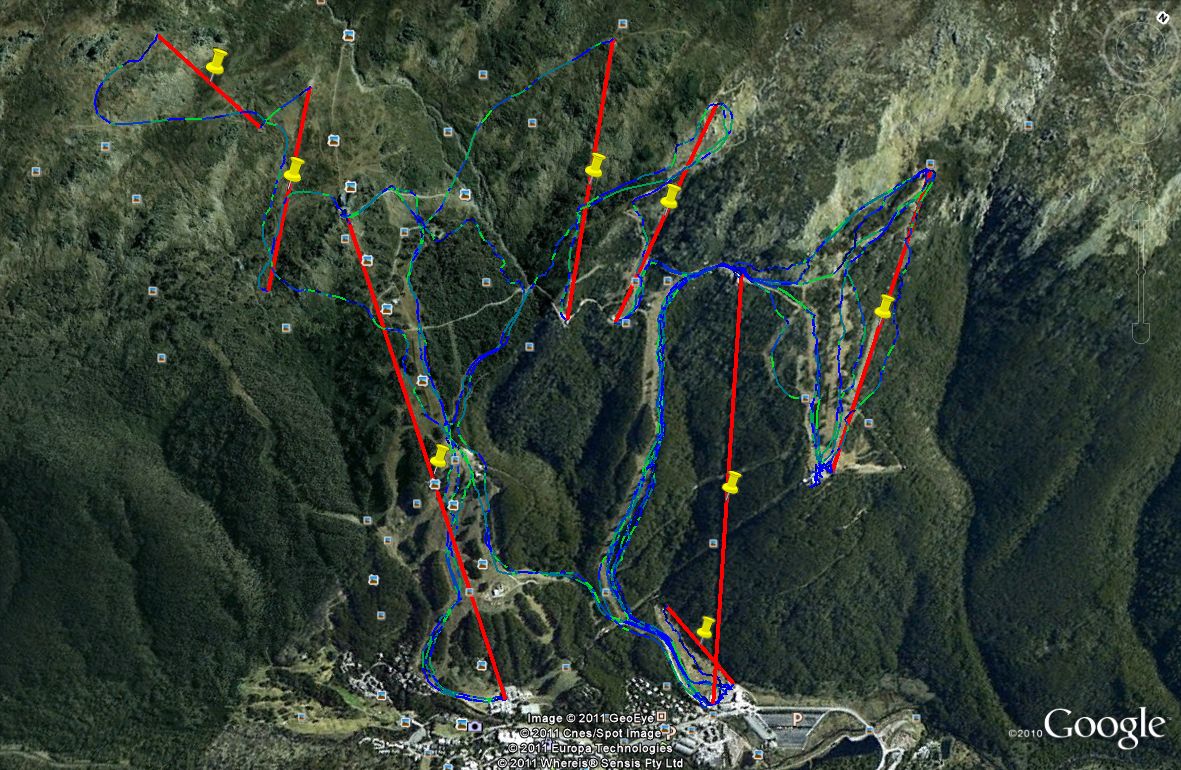
Direct top down view
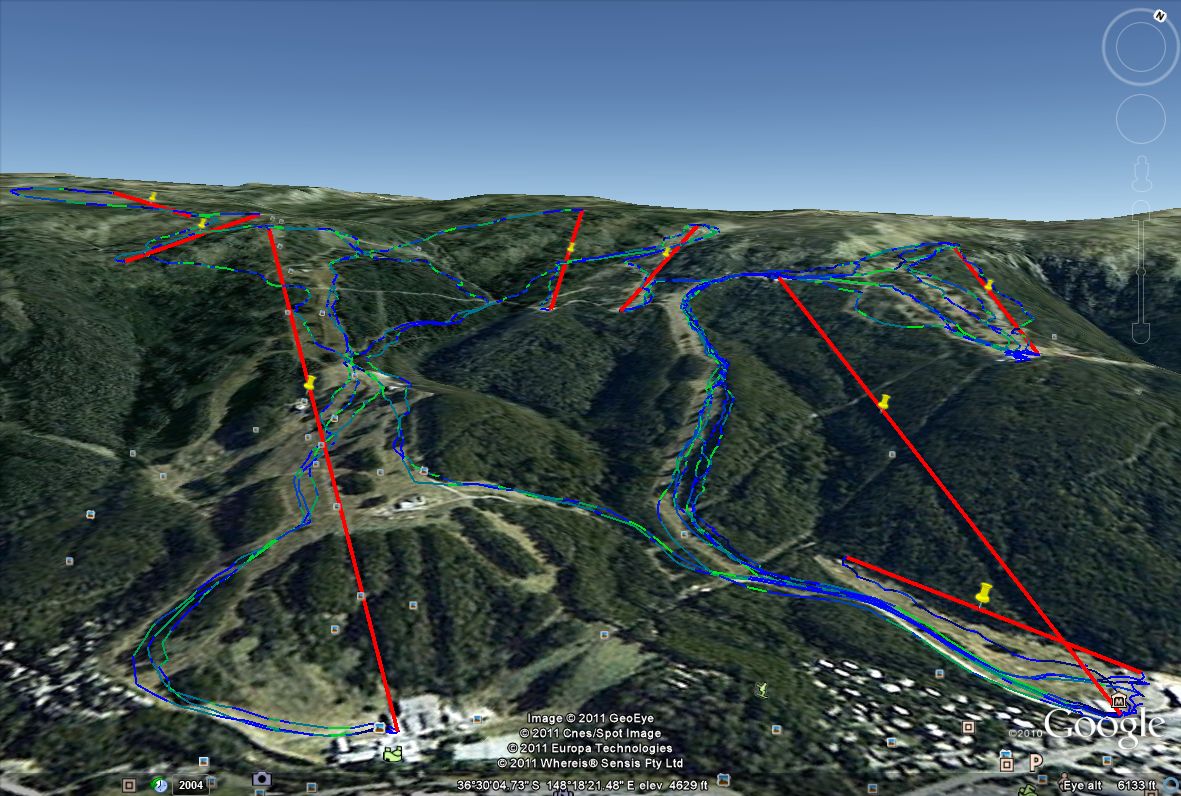
A slightly side on view

A closeup of the lift data
Unfortunately there is no version of this program that i deem suitable for download at the current time. In the future i plan to work on this further making it more efficient as well as turning it into a website where people are able to upload their skiing data to generate their own maps and statistics as well as including some social aspects into the process.
Pyweek 2011 – citySquare
This year I entered into pyweek. Pyweek is a python game programming competition where the competitors are given a theme and have a week to make a game on it. The theme that was voted in this time was "Nine Times" I wasn't really sure what I could do with this theme, and as a result my game is only very loosely linked to the theme.
The game that i came up with is a simple puzzle game where one must lay tiles within a grid to earn points. It plays out a bit of a mildly irritating single player version of Carcassonne. However I was reasonably happy with the game that i ended up with after a week of development.
I was also happy enough with the quality of the game that produced to use it as part of a project in the software design and development course that I am currently doing at school, for this I added a little bit more polish to the menus and gameplay and ironed out its few bugs. My teacher was luckily very impressed by the game and I ended up scoring full marks for the assignment (the game + a ton of documentation)
If after reading though all of that you would still like to play the game there download links and further instructions below
Downloads
The latest version of the game can be downloaded from github HERE
Objectives
The key objective to citySquare is to arrange all of the tiles in the right-hand tray on the grid to the left. The tiles that you have to match are comprised of three different types of terrain: roads, cities and plain old grass.

Controls
A tile can be picked up and put down by left clicking. While being held you can either right click or scroll to rotate the tile. The arrow keys can be used to shift all of the tiles around the grid and you can hold tab to view a breakdown of your score.
To return to the menus from gameplay simply press escape, while on menus you can also toggle full screen mode by pressing F4
Rules
Tiles must be placed so that the edges of each square match up with the squares around it. The entire edge of the grid should be grass and have NO roads or cities touching it.
Scoring
Points are scored based on completed roads and cities, however cities are scored in a way that will reward you for building larger cities. For example one city made up of four tiles would be worth much more than two cities made up of two tiles.
pyGitBook
As part of doing the report for my Software Design and Development project i tried to find an easy tool that i could use to convert all of my git history into a basic (but nice looking) logbook that i could hand in as part of the project.
Unfortunately i couldn't find any tools that would do this for me. The closest i could find was the commit log that git-hub provided something similar to what i was after but provided alot of stuff such as avatars and commit hashes that i didn't need.
So i decided to quickly whip up a script to pass output from git-log and turn it into a nicely crafted logbook.
To interface with git i originally looked into GitPython but it proved to be rather buggy and hard to work with so i ended up going the much more low tech method of just parsing the output of a standard git-log command.
For the output i decided that using HTML via Jinja2 would be the easiest method as it would allow the template to be updated very easily down the track.
Eventually i came up with a system that i am reasonably happy with, it could do with a bit more work but it will do for now, at least until i have got all my projects out of the way.
An example of the output can be seen HERE
The script is available on github at https://github.com/Hugoagogo/pyGitBook